Web app
Open your avatar → Settings → Connected AI assistants.
FINANCEIA · AI CONNECTION GUIDE
From your first connection to an approved transaction: choose what to share, ask about your records and review every proposed change.
https://api.financeia.app/mcpChoose OAuth. No provider API key is needed. Availability depends on your assistant’s account, region and workspace policies; interfaces may change.
Sign in to Financeia and synchronize your records. AI connections are included in every plan and stay off until you consent.
Enable Connected AI assistants, read every consent statement and confirm with your current password.
Share only the Personal or Joint profiles you intend. Read permission enables reports; propose permission also sends suggestions to AI review. Joint access never exceeds your own permissions.
Open your avatar → Settings → Connected AI assistants.
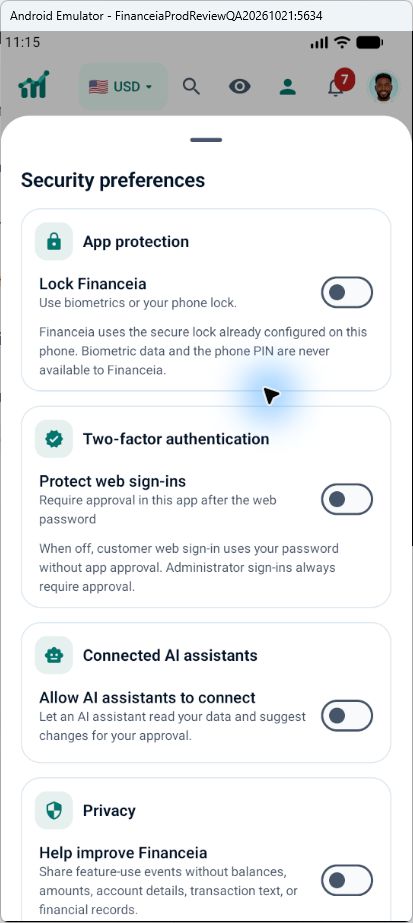
Open your avatar → Settings → Security preferences → Connected AI assistants. Enable the switch and review the consent sheet.

ChatGPT
Use ChatGPT on the web in a workspace that permits custom MCP servers.
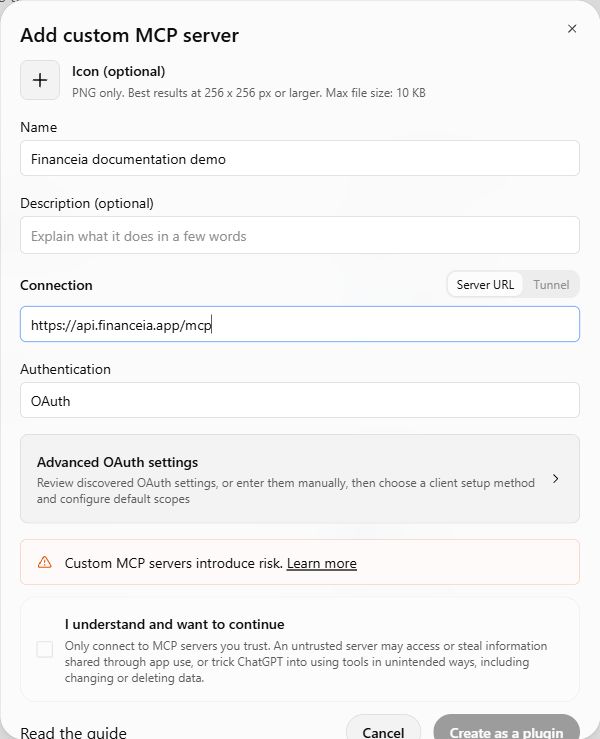
Open Plugins → Add (+) → Add custom MCP server. Older interfaces may place this under Apps or Developer mode.
Name it Financeia, enter the production URL above and select OAuth. Leave client credentials blank unless Financeia issued them to your organization.
Read the notice, acknowledge it and choose Create as a plugin, then Install/Connect. Complete Financeia authorization below.
Start a fresh chat. Type @, select Financeia and ask it to list the profiles you shared. Check the intended account before continuing.
Gemini
Google currently specifies an eligible adult personal account in the US, English and Keep Activity enabled. A subscription alone does not guarantee access; check Google’s current requirements.
Open Customize → Connectors, or Settings → Personal Intelligence → Connected Apps.
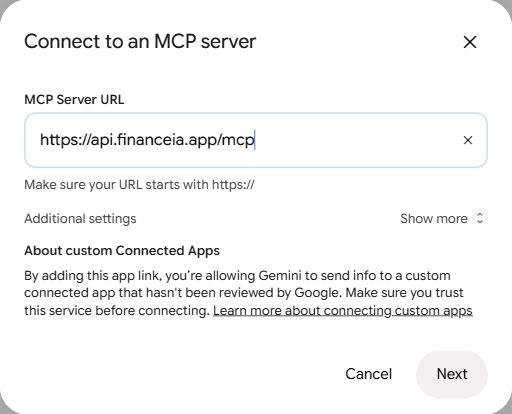
Select Create custom app, enter the production MCP URL and choose Next.
Review Google’s notices, continue with account linking and complete Financeia authorization below.
In a fresh chat, type @ and select Financeia. Ask for your shared profiles. If custom apps are missing, consult Google’s eligibility guidance.
Claude
A Team/Enterprise organization owner may need to add the connector first; each member then authorizes their own Financeia account.
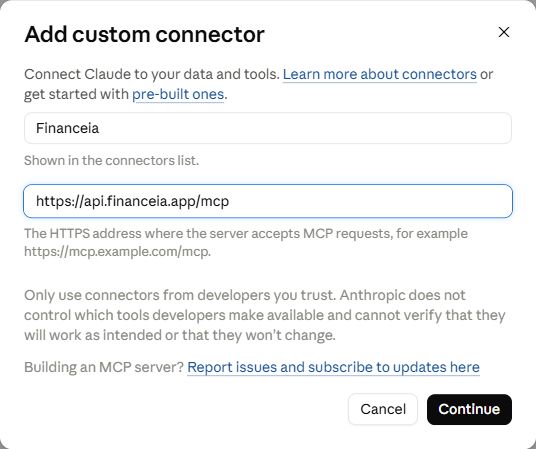
Open Customize → Connectors → Add → Add custom connector. Owners can also use Organization settings → Connectors.
Enter Financeia and the production MCP URL, then Continue.
Choose Sign in now. Use Claude’s supported published identity or automatic registration; do not select No sign-in or paste a bearer token. Add → Connect.
Complete Financeia authorization below. Enable Financeia in the chat’s connectors/tools menu, then ask for your shared profiles in a new conversation.
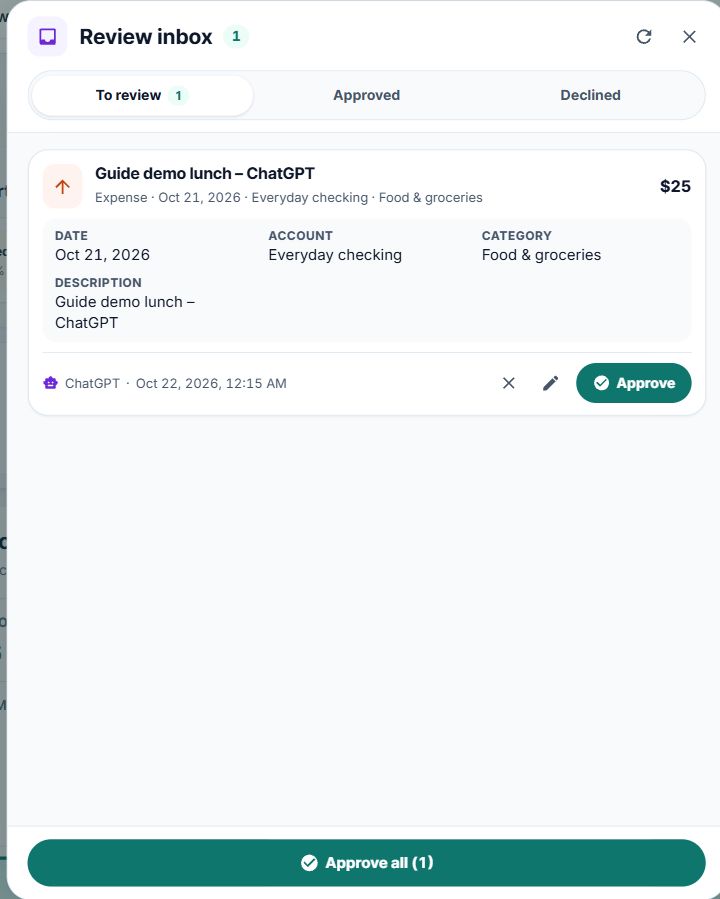
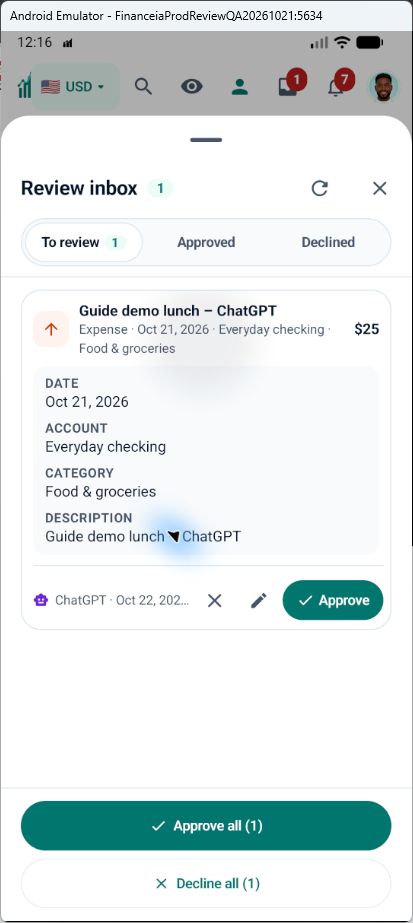
In my Personal profile, propose a USD 25 expense from Everyday checking, category Food & groceries, on 21 October 2026, description ‘Guide demo lunch’. Ask about missing details. Submit it once for review.
First ask the assistant to find the exact profile, account and category and confirm currency, date and time zone. It should ask about missing facts.
Inspect the provider’s tool payload before allowing a proposal. A proposal does not post a transaction or change your balance.
Open AI review in Financeia on web or mobile, select the correct profile and check amount, account, currency, date, category, description and duplicate warnings. Approve the exact reviewed version, edit and review again, or decline. Check your selection before bulk approval.
Wait for confirmation. After an interruption, use get_proposal_status or get_batch_status and verify the transaction through search/detail before retrying. Never resubmit an uncertain batch.
At least three suspected duplicates within 30 seconds can trigger an advisory warning. The assistant should check repeated submissions; the warning does not automatically reject them.
All 58 tools, with permissions and input fields. Technical identifiers stay unchanged to match actual tool calls.
Start with list_profiles, then pass the selected profile_id. Use get_capabilities, get_profile_context and get_data_completeness for supported workflows, time zone, currencies and coverage.
Complete JSON Schema reference (technical contract)
list_profilesRead / simulatePermission: financeia:read
Inputs: None
find_accountsRead / simulatePermission: financeia:read
Inputs: profile_id (required), query, include_inactive, offset
find_categoriesRead / simulatePermission: financeia:read
Inputs: profile_id (required), kind, query, offset
find_holdingsRead / simulatePermission: financeia:read
Inputs: profile_id (required), query, offset
find_propertiesRead / simulatePermission: financeia:read
Inputs: profile_id (required), query, offset
find_instrumentsRead / simulatePermission: financeia:read
Inputs: query (required)
get_financial_snapshotRead / simulatePermission: financeia:read
Inputs: profile_id (required), currency
get_spending_summaryRead / simulatePermission: financeia:read
Inputs: profile_id (required), period_start (required), period_end (required), currency
get_cashflow_summaryRead / simulatePermission: financeia:read
Inputs: profile_id (required), months, currency
get_emergency_runwayRead / simulatePermission: financeia:read
Inputs: profile_id (required), currency
simulate_purchase_impactRead / simulatePermission: financeia:read
Inputs: profile_id (required), amount (required), currency (required)
search_transactionsRead / simulatePermission: financeia:read
Inputs: profile_id (required), period_start, period_end, text, category_id, account_id, limit, cursor
get_account_summaryRead / simulatePermission: financeia:read
Inputs: profile_id (required), offset, limit
get_holdings_summaryRead / simulatePermission: financeia:read
Inputs: profile_id (required), offset, limit
get_property_summaryRead / simulatePermission: financeia:read
Inputs: profile_id (required), offset, limit
get_data_completenessRead / simulatePermission: financeia:read
Inputs: profile_id (required)
propose_transactionsPropose for reviewPermission: financeia:propose
Inputs: profile_id (required), request_summary (required), items (required)
propose_correctionPropose for reviewPermission: financeia:propose
Inputs: profile_id (required), request_summary (required), correction (required)
propose_categoryPropose for reviewPermission: financeia:propose
Inputs: profile_id (required), request_summary (required), category (required)
propose_accountPropose for reviewPermission: financeia:propose
Inputs: profile_id (required), request_summary (required), account (required)
propose_holdingPropose for reviewPermission: financeia:propose
Inputs: profile_id (required), request_summary (required), holding (required)
propose_propertyPropose for reviewPermission: financeia:propose
Inputs: profile_id (required), request_summary (required), property (required)
propose_account_orderPropose for reviewPermission: financeia:propose
Inputs: profile_id (required), request_summary (required), order (required)
get_proposal_statusRead / simulatePermission: financeia:read
Inputs: profile_id (required), proposal_id (required)
get_batch_statusRead / simulatePermission: financeia:read
Inputs: profile_id (required), batch_id (required)
find_entitiesRead / simulatePermission: financeia:read
Inputs: profile_id (required), offset, limit, expected_version, query
list_budget_categoriesRead / simulatePermission: financeia:read
Inputs: profile_id (required), offset, limit, expected_version, query
list_budget_snapshotsRead / simulatePermission: financeia:read
Inputs: profile_id (required), offset, limit, expected_version, query
list_planned_eventsRead / simulatePermission: financeia:read
Inputs: profile_id (required), offset, limit, expected_version, query
list_savings_goalsRead / simulatePermission: financeia:read
Inputs: profile_id (required), offset, limit, expected_version, query
list_debt_plansRead / simulatePermission: financeia:read
Inputs: profile_id (required), offset, limit, expected_version, query
list_entry_templatesRead / simulatePermission: financeia:read
Inputs: profile_id (required), offset, limit, expected_version, query
list_merchant_aliasesRead / simulatePermission: financeia:read
Inputs: profile_id (required), offset, limit, expected_version, query
list_spending_watchlistsRead / simulatePermission: financeia:read
Inputs: profile_id (required), offset, limit, expected_version, query
list_saved_reportsRead / simulatePermission: financeia:read
Inputs: profile_id (required), offset, limit, expected_version, query
list_report_schedulesRead / simulatePermission: financeia:read
Inputs: profile_id (required), offset, limit, expected_version, query
get_capabilitiesRead / simulatePermission: financeia:read
Inputs: profile_id (required)
get_profile_contextRead / simulatePermission: financeia:read
Inputs: profile_id (required)
get_finance_calendarRead / simulatePermission: financeia:read
Inputs: profile_id (required), period_start (required), period_end (required)
get_planned_occurrencesRead / simulatePermission: financeia:read
Inputs: profile_id (required), period_start (required), period_end (required), series_id
get_entity_performanceRead / simulatePermission: financeia:read
Inputs: profile_id (required), period_start (required), period_end (required), currency, entity_code (required)
get_budget_period_reviewRead / simulatePermission: financeia:read
Inputs: profile_id (required), period_start (required), period_end (required)
list_budget_period_historyRead / simulatePermission: financeia:read
Inputs: profile_id (required), offset, limit
get_transaction_detailRead / simulatePermission: financeia:read
Inputs: profile_id (required), event_id (required)
get_transaction_historyRead / simulatePermission: financeia:read
Inputs: profile_id (required), event_id (required), cursor
get_transaction_allocationsRead / simulatePermission: financeia:read
Inputs: profile_id (required), event_id (required)
get_account_balance_historyRead / simulatePermission: financeia:read
Inputs: profile_id (required), account_id (required), months, through
get_holding_valuation_historyRead / simulatePermission: financeia:read
Inputs: profile_id (required), holding_id (required), offset, limit, expected_version
get_holding_detailRead / simulatePermission: financeia:read
Inputs: profile_id (required), holding_id (required)
get_property_detailRead / simulatePermission: financeia:read
Inputs: profile_id (required), property_id (required)
get_property_valuation_historyRead / simulatePermission: financeia:read
Inputs: profile_id (required), property_id (required), offset, limit, expected_version
get_transaction_review_queueRead / simulatePermission: financeia:read
Inputs: profile_id (required), query
get_spending_watchlist_progressRead / simulatePermission: financeia:read
Inputs: profile_id (required)
get_notification_preferencesRead / simulatePermission: financeia:read
Inputs: profile_id (required)
get_reporting_ratesRead / simulatePermission: financeia:read
Inputs: profile_id (required), currency
get_saved_book_searchesRead / simulatePermission: financeia:read
Inputs: profile_id (required)
get_portfolio_evidenceRead / simulatePermission: financeia:read
Inputs: profile_id (required), period_start (required), period_end (required), currency
Preserve period, currency, observation dates, revision and data-quality metadata. Follow pagination; transaction search returns at most 25 records per page. Restart consistently if the revision changes. Missing values are not zero. Saved budget snapshots are historical evidence. Assistant explanations are not professional financial advice.
Check the provider’s plan, region, language and workspace policies. A team owner may need to add it; use the official instructions above.
Reload Financeia’s sign-in tab and let Cloudflare’s normal check finish. Check connectivity and content blockers. If it persists, contact support with the time and error; do not bypass verification.
Ask for list_profiles. Check your Financeia account, selected profiles, synchronization and data completeness. Start Connect again if authorization expired.
Check proposal/batch status and AI review first. Inspect duplicate warnings and decline unwanted pending suggestions; do not resend blindly.
In Financeia Settings → Connected AI assistants, revoke the connection, remove a shared profile or disable AI connections. Also remove/disconnect it in the provider. Future access stops; information already sent is not erased.
This guide uses production. Staging has separate accounts and access controls. Never share private records with a test connection by mistake.